

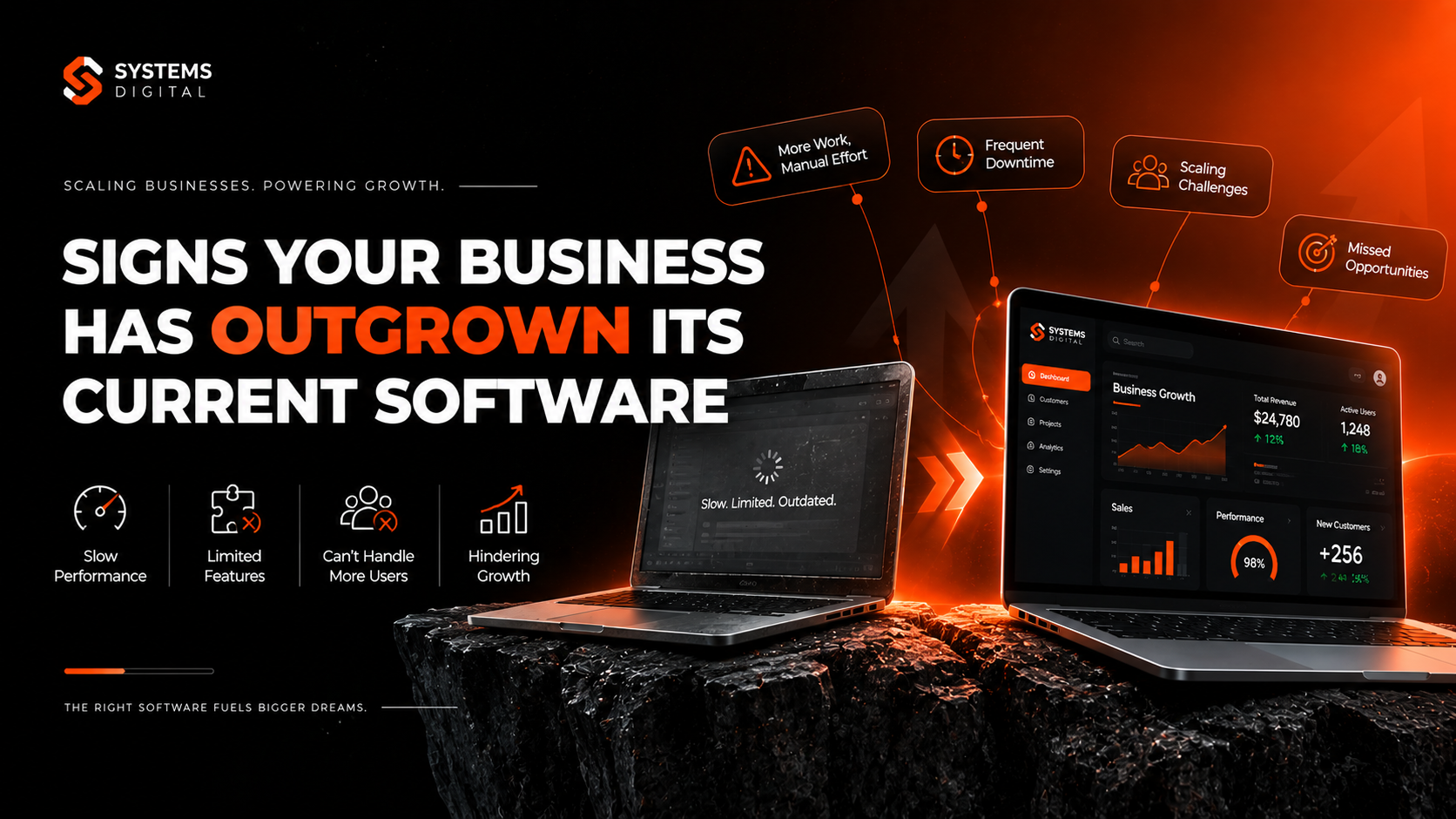
Every growing business hits an invisible wall. Sales are up, the team is bigger, and customers keep coming — but somehow, day-to-day operations feel slower and messier than they did a year ago. If that sounds familiar, the problem usually isn’t your people. It’s your software.
Recognizing the signs your business has outgrown its software early can save you months of wasted time, thousands of dollars in hidden costs, and a lot of team frustration. In this guide, we’ll walk through the clearest warning signs, explain why they happen, and show you exactly how to decide when to upgrade business software versus when it’s time to replace it entirely.
Whether you’re running a small business hitting its first major growth spurt or a mid-sized company scaling into new markets, this article will help you spot the cracks before they become costly breaks.
Think of business software the way you’d think of office space. A tool that comfortably supported ten employees, a few hundred orders a month, and a handful of reports doesn’t automatically stop working once you hit fifty employees and thousands of transactions — but it does stop being efficient. The walls don’t fall down. They just get a little tighter every quarter until, one day, everyone notices the squeeze at the same time.
What Does It Mean When a Business Has Outgrown Its Software?
A business has “outgrown” its software when the tools it relies on can no longer support the volume, complexity, or speed of its operations. The software still technically works — it just can’t keep up.
This is different from software that’s simply broken or buggy. Outgrown software usually still runs fine on paper. The real problem shows up in the gap between what your business needs today and what the system was originally built to handle. That gap widens quietly, through manual workarounds, duplicate data entry, and reports that need to be “fixed” by hand before anyone trusts them.
It rarely announces itself with a dramatic system crash. Instead, it arrives gradually — through habits, workarounds, and inefficiencies that become so normal nobody questions them anymore, until someone finally asks: “Why does this take so long?”
This is an important distinction for business owners to internalize. Software that has been outgrown is not necessarily bad software — it may simply be the wrong software for the business’s current stage. A tool that was perfect for a five-person startup can become a genuine liability once that same company has fifty employees, three warehouses, and customers spread across multiple regions. The mismatch between tool and scale, not the quality of the tool itself, is usually the real issue.
It also helps to understand that this pattern repeats at every stage of business growth, not just once. Companies typically outgrow their first “starter” systems within two to four years of consistent growth, and many outgrow their next platform again five to seven years after that. Recognizing this as a normal, recurring part of scaling — rather than a one-time emergency — makes it much easier to plan for calmly instead of reacting under pressure.
Why This Matters More Than Most Businesses Realize
Ignoring outdated business software doesn’t just cost convenience — it costs money, time, and competitive advantage. Research from Gartner has found that a large share of most organizations’ IT budgets — commonly cited in the 60–80% range — goes toward simply maintaining existing legacy systems rather than building new capabilities, leaving little room for the innovation that growth actually requires.
On top of that, rising costs are becoming the norm rather than the exception. A Forrester study found that a significant majority of technology decision-makers — around 79% — saw their software costs increase over the past year, which makes it even more important to know exactly what you’re paying for and whether it’s still delivering value.
In short: the longer a business runs on software it has outgrown, the more expensive — and risky — the eventual transition becomes.
There’s also a competitive dimension to this that’s easy to overlook. While your team is busy building manual workarounds, your competitors who invested earlier in scalable, integrated systems are moving faster — quoting customers sooner, closing the books faster, and making decisions on same-day data instead of last week’s. Technology holding back business growth doesn’t just cost you internally; it can quietly cost you market position, too.
Finally, there’s the people cost. Skilled employees rarely stay motivated doing manual data entry or chasing down numbers across five spreadsheets. Persistent software bottlenecks in growing businesses are a well-documented contributor to employee turnover, particularly among the operations, finance, and customer service staff who interact with these systems every single day. Replacing outdated systems isn’t just an IT upgrade — it’s often a retention strategy in disguise.
12 Signs Your Business Has Outgrown Its Current Software
Here are the clearest, most common signs you need new business software — and what each one usually looks like in practice.
1. Your Team Relies on Manual Workarounds
If employees are building their own spreadsheets to “fix” what the main system can’t do, that’s a major red flag. Manual workarounds software problems are one of the earliest and most telling signs of outgrown systems. When staff quietly patch gaps with copy-paste routines, side spreadsheets, or sticky-note processes, it means the software isn’t doing its job anymore — people are doing it for the software.
These workarounds tend to multiply silently. One employee builds a spreadsheet to track something the system can’t, a colleague copies the habit, and within a year an entire “shadow system” exists outside the official software — undocumented, unbacked-up, and known only to a handful of people. When that employee eventually leaves, the workaround often leaves with them, taking institutional knowledge along with it.
2. Data Lives in Silos Across Different Systems
Business data silos happen when your sales team, finance team, and operations team are all working from different, disconnected versions of the truth. If nobody can get a single, accurate view of the business without pulling numbers from five different tools, your systems are no longer integrated enough to support your size.
3. Reports Take Days Instead of Minutes
Slow business management software often shows up first in reporting. If generating a basic monthly report requires manual exports, formula fixes, and cross-checking between systems, you’re spending valuable hours on tasks that modern software should handle in seconds.
This delay has a compounding effect on decision-making. Leaders end up making calls based on data that’s already a week or two old by the time it reaches them, which means the business is always reacting to where things stood in the past rather than where they stand right now. In fast-moving markets, that lag alone can be the difference between catching a problem early and discovering it only after it has already become expensive.
4. Integration Problems Are a Constant Headache
Software integration challenges multiply as a business adds new tools. CRM integration problems, ERP integration problems, and general third-party software integration issues are common signs that your core systems were never designed to talk to each other — or to the newer tools your business now depends on.
5. Duplicate Data Entry Is the Norm
If your team enters the same customer information, invoice, or order into two or three different systems, that’s a clear sign of fragmented business software. Duplicate data entry doesn’t just waste time — it introduces errors that ripple through your entire operation.
6. The System Slows Down as You Grow
Software scalability issues tend to appear right when you need reliability the most — during your busiest, highest-growth periods. If your platform lags, crashes, or times out more often as transaction volume rises, it’s not built to scale with your business.
This is particularly damaging because it tends to show up during peak season, product launches, or major sales events — exactly when the system needs to be most reliable. A checkout platform that slows down during a holiday sales rush, or an ERP system that grinds to a halt during month-end close, isn’t just an inconvenience. It’s a direct hit to revenue and customer trust at the worst possible moment.
7. Employees Are Frustrated and Disengaged
Poor software user experience has a direct impact on morale. Employee productivity software issues — clunky interfaces, slow load times, confusing navigation — push good employees toward workarounds, errors, and eventually, burnout. If your team dreads using the “system,” that’s worth listening to.
8. Costs Keep Climbing Without Clear Value
Rising software maintenance costs are one of the most measurable signs your business is outgrowing its stack. When you start noticing hidden costs of legacy software — support fees, patchwork add-ons, consultant hours just to keep things running — it’s time to calculate the total cost of ownership honestly, and compare it to what modern, scalable alternatives would cost.
It’s worth doing this math on paper at least once a year. Add up license renewals, support contracts, the cost of any specialized IT staff or consultants needed just to keep the system running, and the value of the hours your team spends on manual workarounds. Businesses are often surprised to find that the “cheap, familiar” legacy system is quietly costing more than a modern replacement would — it’s just spread across so many smaller line items that nobody adds it all up in one place.
9. Compliance and Security Are a Growing Concern
Outdated software security vulnerabilities and business software compliance issues tend to increase the longer a legacy system stays in place. Older platforms often fall behind on security patches, data protection standards, and industry-specific compliance requirements — a risk that grows heavier as your business grows bigger.
10. You’re Locked Into a Single Vendor
Software vendor lock-in becomes a real business software limitation when a single provider controls your data, pricing, and upgrade path — with no easy way out. If switching feels nearly impossible because of proprietary formats or contract terms, that dependency itself is a sign of outgrown software.
11. New Employees Take Too Long to Get Up to Speed
If onboarding a new hire onto your core systems takes weeks instead of days because the workflow is confusing or undocumented, that’s a productivity drain hiding in plain sight. Modern, scalable software for growing businesses is generally intuitive enough that new employees can be productive quickly.
12. Leadership Can’t Get Real-Time Answers
Perhaps the clearest sign of all: if your leadership team can’t answer basic questions about the business — current cash position, top-selling products, active customer issues — without waiting on a manual report, your technology has become a bottleneck instead of an advantage. This is one of the strongest signs of technology holding back business growth.
Upgrade vs. Replace: How to Decide
Not every sign above means you need to rip out your entire tech stack. Sometimes an upgrade is enough. Here’s a simple way to think about the software upgrade vs. replacement decision:
Consider an upgrade when:
- The core platform still fits your business model
- Problems are isolated to specific modules or features
- Your vendor offers a clear, supported upgrade path
- Integration issues can be solved with middleware or APIs
Consider a full replacement when:
- Multiple systems across departments are all showing strain
- The platform can’t scale no matter how much you configure it
- Maintenance and support costs keep rising with no end in sight
- Your business model has fundamentally changed since you first implemented the software
- Security or compliance risks can’t be resolved within the current system
A proper business systems audit — reviewing every core platform against your current and near-future needs — is the best way to make this call with confidence, rather than guessing.
How to Choose Scalable Software for Growing Businesses
Once you’ve confirmed it’s time to move forward, choosing the right replacement matters just as much as recognizing the problem. Here’s a practical framework for a solid software needs assessment:
- Map your current workflows first. Before evaluating new tools, document exactly how work actually happens today — not how it’s supposed to happen on paper.
- Prioritize integration capability. Look for software with open APIs and pre-built integrations, so you’re not rebuilding this same problem in three years.
- Test for scalability, not just current fit. Ask vendors directly how their platform performs at 2x, 5x, and 10x your current volume.
- Involve the people who’ll use it daily. The employees closest to the workflow will spot usability issues that leadership often misses.
- Evaluate total cost of ownership, not sticker price. Factor in implementation, training, support, and future upgrade costs — not just the monthly subscription.
- Choose cloud-based platforms where possible. Cloud-based business software generally scales more easily, updates automatically, and reduces the IT overhead of maintaining physical infrastructure.
- Plan the migration in phases. A phased business software migration strategy — starting with the highest-impact department — reduces risk compared to switching everything at once.
Common Mistakes Businesses Make When Switching Software
Recognizing the signs is only half the battle — how you act on them matters just as much. A few mistakes come up again and again during business software transitions:
- Waiting too long to start the process. Many businesses wait until a system fails outright before acting, which forces a rushed decision under pressure instead of a carefully planned one.
- Choosing software based on features alone. A long feature list means little if the platform doesn’t fit your actual workflows or can’t scale with your specific growth pattern.
- Skipping the data migration plan. Moving years of historical data between systems is one of the most underestimated parts of any business systems migration, and it deserves its own dedicated plan and timeline.
- Underinvesting in training. Even the best software will underperform if employees aren’t properly trained to use it — budget time and resources for this from day one.
- Trying to switch everything at once. A “big bang” replacement across every department simultaneously carries far more risk than a phased rollout that lets you learn and adjust as you go.
Avoiding these mistakes is often what separates a smooth business technology upgrade from a stressful, over-budget one.
The Benefits of Modernizing at the Right Time
It’s easy to focus only on the pain of outgrown software, but it’s worth being just as clear about what businesses gain once they modernize at the right moment:
- Faster decision-making, because leaders can pull accurate, real-time data instead of waiting on manual reports.
- Lower operating costs over time, as manual workarounds, duplicate systems, and rising maintenance fees are replaced with a single, efficient platform.
- Stronger security and compliance posture, since modern platforms are typically updated continuously rather than patched occasionally.
- Better employee experience and retention, because staff spend their time on meaningful work instead of repetitive data entry.
- Room to grow without another disruptive overhaul, since scalable software is built to expand alongside the business rather than needing to be replaced again in a year or two.
None of these benefits require switching software constantly — they simply require paying attention to the signs and acting while the transition is still a choice, not an emergency.
Real-World Example: How the Signs Show Up in Practice
Consider a mid-sized distribution company that started with a simple inventory and invoicing tool when it had a handful of employees. Five years later, with dozens of staff and thousands of monthly orders, the same tool was still technically running — but the cracks were everywhere.
The warehouse team kept a side spreadsheet to track stock levels because the software’s inventory counts were often a day behind. Finance re-entered every invoice into a separate accounting platform because the two systems never talked to each other. New hires took nearly a month to learn workarounds that experienced staff had picked up out of habit.
None of these problems, on their own, looked like an emergency. Together, they were quietly costing the company hours of labor every single week — and slowing down decisions that should have taken minutes. This is exactly the kind of gradual, hard-to-notice drag that signals a business has outgrown its software: not one big failure, but dozens of small ones compounding over time.
Future-Proofing Your Business Technology
Modernizing business software isn’t a one-time project — it’s an ongoing discipline. A few habits help businesses avoid hitting this wall again:
- Schedule regular technology stack evaluations — at least once a year, review whether your current systems still match your business size and complexity.
- Build in scalability from the start when choosing new tools, rather than optimizing purely for today’s needs.
- Invest in workflow automation software to reduce manual, repetitive tasks before they pile up into full-blown inefficiencies.
- Keep integration in mind with every new purchase — a great tool that doesn’t connect to the rest of your stack just creates another silo.
- Treat software decisions as growth decisions, not just IT decisions — involve operations and finance leaders early.
Businesses that scale smoothly aren’t the ones that never face this problem — they’re the ones that catch the signs early and act before outdated systems become a hard limit on what the business can achieve.
Frequently Asked Questions
How do you know when your business needs new software? The clearest signals are manual workarounds becoming routine, data spread across disconnected systems, reports that take too long to trust, and rising costs without matching value. If several of these show up together, it’s a strong sign you need new business software.
What are signs of outdated technology in a business? Common signs include frequent slowdowns during busy periods, integration problems between tools, security vulnerabilities from unpatched systems, and employees creating their own workarounds to get basic tasks done.
How often should a business update its software? There’s no fixed timeline, but a yearly technology stack evaluation is a good baseline. Fast-growing businesses may need to reassess every six months, especially after major growth milestones like new locations, product lines, or a significant increase in headcount.
What happens if a business doesn’t upgrade its systems? Over time, the gap between what the software can do and what the business needs widens. This typically shows up as rising maintenance costs, more manual errors, slower decision-making, and, eventually, a bigger and more expensive replacement project than if the issue had been addressed earlier.
How much does it cost to switch business software? Costs vary widely depending on company size, the number of systems involved, and whether data migration is complex. A proper cost comparison should include implementation, training, and potential downtime — not just the software’s subscription price — and should be weighed against the ongoing cost of staying on outdated systems.
What is software scalability and why does it matter? Software scalability is a system’s ability to handle more users, more data, and more complexity without a drop in performance. It matters because businesses that grow quickly need software that grows with them — otherwise, the technology itself becomes the bottleneck holding the business back.
Should a growing business upgrade its existing software or replace it entirely? It depends on how widespread the problems are. If issues are limited to one module or feature, an upgrade or add-on may solve it. If multiple departments are affected, costs keep rising, and the platform can’t be configured to scale further, a full replacement is usually the more cost-effective long-term choice.
How long does a software migration take for a small business? Timelines vary based on complexity, but a straightforward migration for a small business can take anywhere from a few weeks to a few months, while larger, multi-department transitions can take six months to a year when done in careful, well-planned phases.
Conclusion: Don’t Wait for the Breaking Point
Outgrowing your software isn’t a failure — it’s actually a sign of success. It means your business has grown past what your original systems were built for. The real risk isn’t outgrowing your software; it’s ignoring the signs for too long and letting outdated technology quietly slow down a business that’s otherwise ready to scale.
If any of the signs above sound familiar — manual workarounds, disconnected data, rising costs, or a team that’s frustrated with the tools they use every day — it’s worth taking a closer look now, before the gap gets any wider.
Ready to find out if your current systems can keep up with where your business is headed? Explore Advanced Services at System Digital to get a clear, practical assessment of your technology stack — or learn more about why businesses choose System Digital to guide them through a smooth, low-risk software transition. Book a seat with our team today and take the first step toward software that grows with you, instead of holding you back.
Sources: Gartner IT spending and legacy system research; Forrester technology cost research, as cited via 2Base Technologies and Appello.